Most business owners don’t question their payment processing. Not because they have analyzed it and decided it’s optimal. Usually, it’s because it feels fine, money comes in, books reconcile, and nothing breaks. That’s enough, until someone actually looks at the numbers. The percentage you thought you were paying is not what you are actually paying.

Why Understanding QuickBooks Payments Costs Matters
Processing fees are one of the expenses that can scale with your success. As revenue goes up, so do the fees.
At $30,000 a month, the difference between 2.5% and 3% feels manageable ($750+ vs. $900+). At $100,000, that same gap nearly triples ($2,500+ vs. $3000).
The tough part for business owners is how invisible it is. There is no line (or magic fairy) that says “you are overpaying here.” Costs are spread across transactions, card types, entry methods, and timing. So most businesses never really see it. They just feel tighter margins and assume something else is the cause.
What Is QuickBooks Payments?
QuickBooks Payments is the accounting software QuickBooks’ payment acceptance platform. It allows merchants to process transactions within the same system they also use to handle their accounting. Businesses can send a digital invoice where the customer can click a button to pay within the link, and the books update automatically. It is clean, convenient, and it removes a lot of manual work.
For smaller operations or early-stage businesses, that simplicity is hard to argue with. There is no setup headache, no real decision-making required. It just works. The part that gets less attention is what sits underneath that convenience.
QuickBooks Payments Fees Explained
QuickBooks, like many payment platforms, uses a flat-rate pricing model. Flat rate doesn’t mean every transaction costs the same, regardless. The rate is consistent, rather, depending on how the transaction was processed.
Typical rates look like this:
- In-person payments: around 2.5%
- Online or invoiced payments: around 2.99%
- Keyed-in transactions: around 3.5%
- ACH bank transfers: around 1%, often uncapped
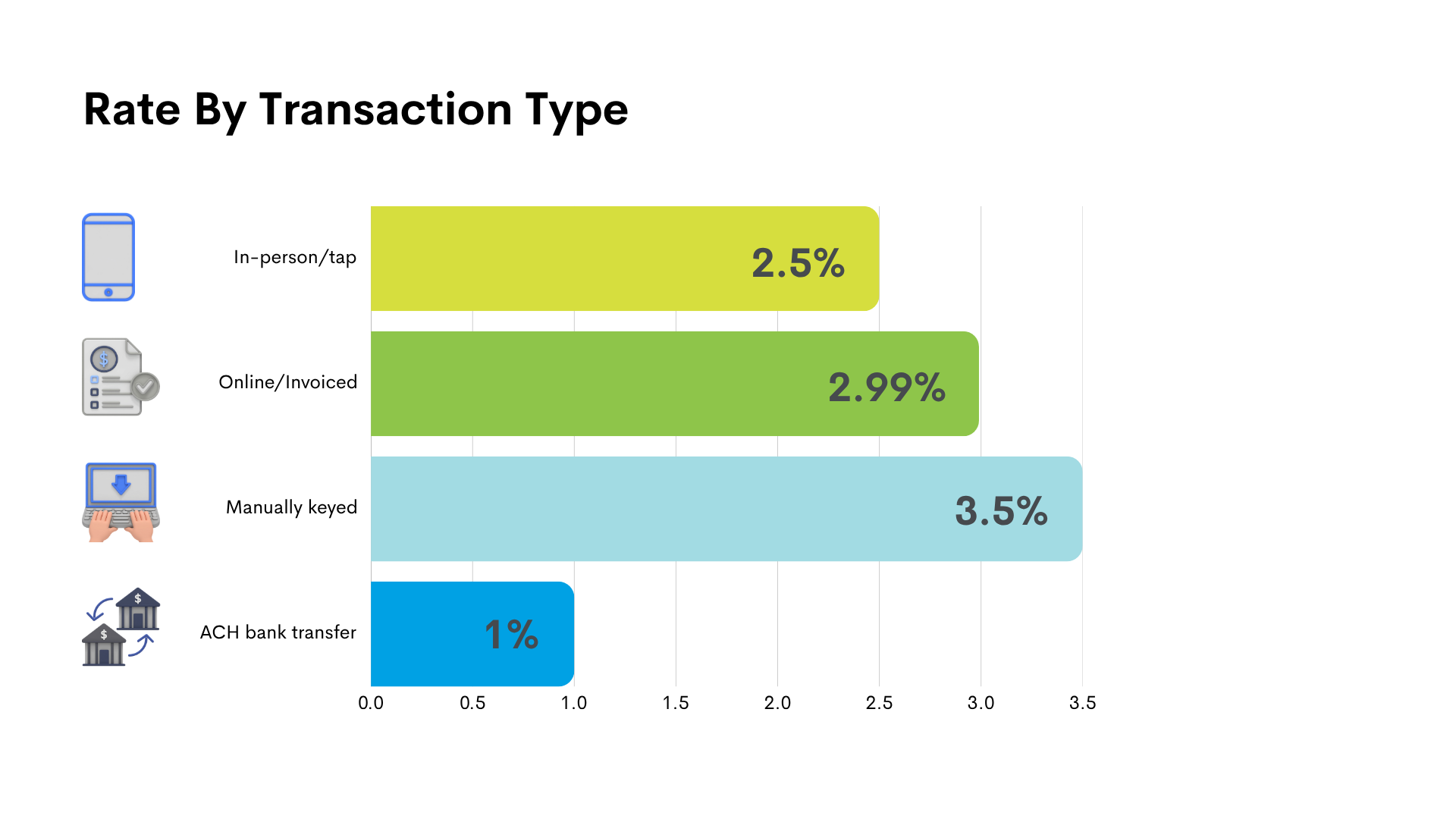
As you can see, a manually keyed payment at 3.5% costs significantly more than a card-present transaction at 2.5%. And if your business relies heavily on invoicing or remote payments, you are likely operating in the higher fee categories most of the time.
The Hidden Costs of QuickBooks Payments
Your rates are only part of what you end up paying inside QuickBooks. The real cost shows up in how the platform is used.
Transaction Type
Let’s start with invoices. That is where most QuickBooks users live. The convenience of sending a payment link directly from an invoice is hard to beat. It is also one of the higher-cost ways to accept a card. If most of your revenue comes through invoiced payments, you are consistently sitting near the top end of the pricing structure without really thinking about it.
On the flip side, there is manual entry. When a card number is manually keyed in, those transactions fall into the highest pricing tier of all, and they add up fast.

The cost effectiveness of ACH looks like the obvious alternative, and it can be. But many businesses overlook it and never actively steer customers toward it. The option exists, but the default behavior stays on cards, which keeps overall costs elevated.
Card Type
Card mix plays a role as well. You can’t control whether a customer uses a basic debit card or a high-reward business credit card. But within a fixed pricing structure, those differences are absorbed into your rate. You end up paying the same percentage, even when the underlying cost of the transaction varies.
Settlement Speed
Deposit speed is another factor that can increase your fees. QuickBooks offers faster access to funds. YAY..for a fee. Oh. It may feel minor in the moment, especially when cash flow is tight, but over time, those expedited deposits stack onto your total processing expense.

Ultimately, QuickBooks shows you fees, but it does not break them down in a way that makes it obvious for you to understand how to optimize. You can see what you paid. But it is harder to see why you paid it or how to reduce it.
None of these costs are unusual on their own. What makes them feel like you’ve just been slighted is how easily they blend into the workflow. The QuickBooks system is designed for simplicity, which is great. But the side effect is that cost drivers stay out of focus.
Pricing Model Breakdown
QuickBooks leans on a fixed pricing structure. You are not negotiating interchange or optimizing individual transaction costs. You are paying a set percentage based on how the payment comes in. That is what makes it easy. It is also what limits you.
Because once volume increases, you start noticing something. The system does not reward you for growing. Your rate does not improve. Your cost does not get smarter. It just scales. And at some point, that starts to feel inefficient.
How to Calculate Your True Cost with QuickBooks Payments
If you want clarity on your actual costs to process a transaction, ignore the advertised rates. Take your total fees for the month and divide them by your total processed volume. That number is your new reality. Most businesses are surprised the first time they do this. A “2.9%” expectation turns into something north of 3% once everything is included.

Then the second layer becomes more interesting. Where is the volume coming from? How much is invoiced versus in-person? How often are payments being keyed manually? That is where you stop guessing and start seeing patterns.
Common Scenarios Where Businesses May Pay More
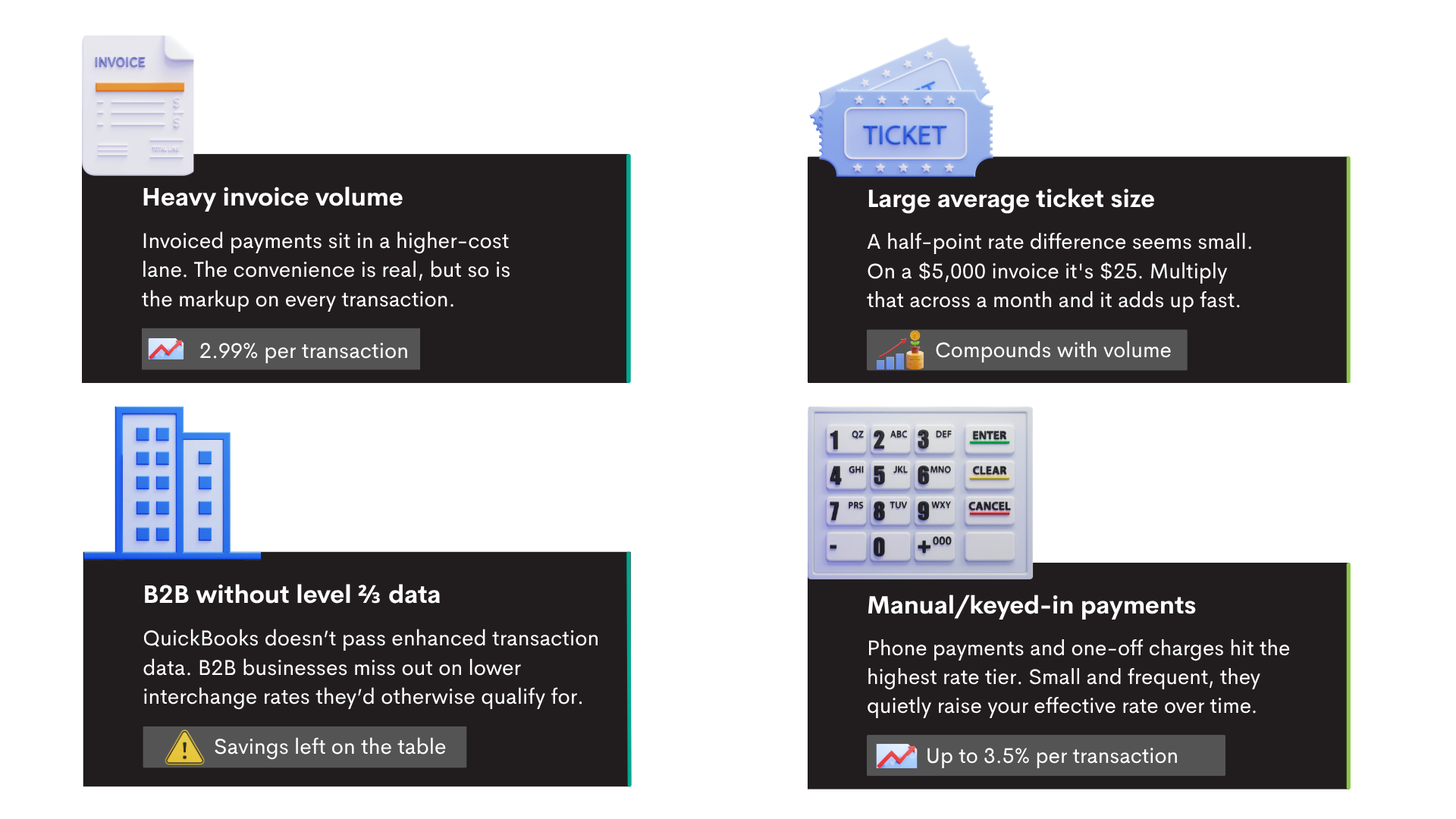
Some businesses end up paying more in QuickBooks without realizing it, and it usually comes down to how they get paid day to day.
If most of your revenue comes through invoices, you are already operating in one of the higher-cost lanes. It feels efficient, and it is, but that convenience tends to carry a higher percentage behind it.
Ticket size matters too. A half-point difference in fees does not sound like much until your average transaction is a few thousand dollars. Then it starts turning into real money, real fast.
B2B companies run into a different issue. There are ways to qualify transactions for lower costs using additional data, such as Level 2 or Level 3 data, but QuickBooks does not really optimize for that. So, unless you know to look for it, you are likely leaving savings on the table without realizing it.
Manual entry, as mentioned before, is a huge cost factor. A phone payment here, a quick charge there. Over time, those transactions stack up at the higher end of the pricing range and quietly push your overall cost higher.
How to Reduce Payment Processing Costs When Using QuickBooks
There is still room to improve things without leaving the platform. But it requires being more intentional. Start with the payment type. If a customer is comfortable paying by bank transfer, that is almost always cheaper than running a card. You do not need to force it, but you can guide it.
Then look at how payments are being captured. Keyed-in transactions carry higher costs. Even small shifts toward more secure or automated entry methods can make a huge difference over time.
Finally, track your effective rate like you would any other expense. If it is drifting upward and you cannot explain why, that is a signal that you need to do an analysis of your transactions.
When It Might Make Sense to Explore Alternatives
There is usually a trigger that indicates when it’s time to explore alternative payment solutions. Revenue grows, but profitability does not follow the same curve. Fees start to stand out in reports. Or payments become more complex than simple invoice links.
These types of scenarios trigger business owners to start asking better questions. At lower volumes, the difference between pricing models is easy to ignore. At higher volumes, it becomes difficult to justify. What used to feel like a small percentage starts looking like a fixed drag on the business.
At the same time, operational needs change. Businesses want more visibility. More control. More flexibility in how payments are handled. Convenience alone isn’t enough at a certain point.

QuickBooks Payments vs Other Payment Processing Options
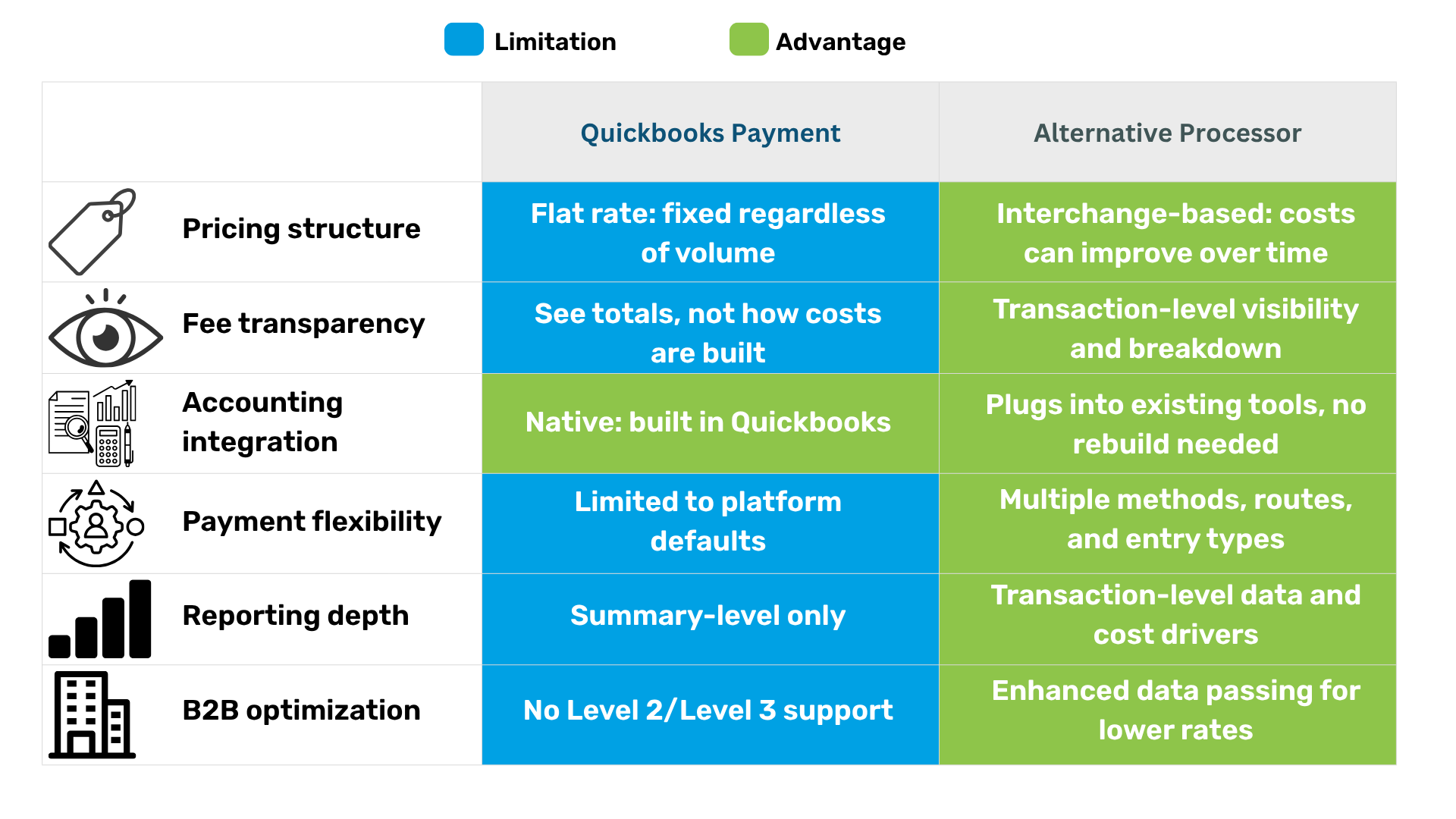
QuickBooks is built to keep things simple inside its own environment. Other processors tend to approach things differently. More flexibility in pricing, visibility into how transactions are actually being priced, and control over how payments are routed and qualified.
There is a tradeoff. It is not plug-and-play. The upside is that you are no longer locked into a one-size structure. You can start shaping how your costs behave instead of just accepting them.
What to Look for in a Payment Processing Alternative
If you are evaluating options, the surface features matter less than the structure underneath. Pricing transparency is the first thing to look at. If you cannot see how costs are built, you cannot improve them.
As far as integrating your payments into your accounting, you shouldn’t have to rip apart your entire setup. You should be able to plug into what you’re already using without creating extra work.
Flexibility is another one that gets underestimated. The more ways you can accept payments efficiently, the more control you actually have over cost. If everything is locked into one method, you’re stuck with whatever that pricing structure gives you.
Reporting is where most decisions get made. If you cannot see what is happening at the transaction level, you are operating blind.
Why ECS Payments Is a Better Alternative for Lower Costs and Simplified Integration
ECS Payments is an alternative payment platform that approaches payment integration differently. Rather than bundling everything into one flat rate, we’ve built our system around how the card networks actually price transactions. Then we seamlessly integrate into your QuickBooks or current accounting software.
When transactions are set up the right way, the right data is being passed, and your payment methods match how your business actually operates, your effective rate starts to move in a better direction. And the more volume you’re doing, the more that difference shows up.
It also does not force you to abandon tools like QuickBooks. You keep the accounting environment that works. The change happens in how payments are processed and optimized behind it. You go from accepting whatever the system charges to having influence over what you pay.
Final Thoughts
QuickBooks Payments makes getting paid easy. But ease and efficiency are not the same thing. At some point, every growing business runs into the realization of that difference. The question is how long it took you to notice and what you’ll do about it.
If you have never calculated your effective rate, start there. Then look at how your payments are actually coming in. Not just totals, but methods, patterns, and cost drivers. From there, the decision becomes clearer. Because once you see what you are really paying, it is hard to unsee it.
Contact ECS Payments to get started with a better payment processing flow for your business.
