There are certain moments that happen in growing businesses that show the cracks. For example, is your checkout line moving a little slower than it should? Have you noticed that your inventory counts don’t match what’s actually on the shelf? Are your managers spending half an afternoon building a sales report that somehow still raises more questions than it answers? Many business owners assume these are all separate problems….they’re often not. In many cases, they’re symptoms of a point-of-sale system that no longer aligns with how the business operates.
That’s why point-of-sale systems have become such a critical part of business infrastructure. What used to be a simple cash register has evolved into a platform that influences everything from inventory management and customer experience to payment processing and reporting.
For retailers, restaurants, service providers, and multi-location operations, the POS system often determines how efficiently the entire business runs. The companies gaining an edge today aren’t necessarily working harder. They’re working with better information.
What Is a Point of Sale System?
Ask ten business owners “what is a POS system,” and you’ll probably get ten different answers. Some think of the card reader sitting on the counter. Others picture a touchscreen register. Many associate it strictly with payment processing. Technically, they’re all right.
A point-of-sale system is the combination of hardware and software that allows a business to complete transactions while tracking the activity surrounding those sales. The transaction itself is only one piece of the puzzle.
Most POS systems include:
- Payment terminals and card readers
- POS software
- Inventory tracking tools
- Reporting and analytics features
- Customer management capabilities
- Employee management functions
The difference between older systems and today’s business point-of-sale systems is substantial.
Traditionally, registers recorded a sale. That’s it. But modern POS platforms record the sale, update the inventory, store customer data, sync reports, track employee activity, and communicate with payment processors…all within a few seconds.
How Point of Sale Systems Work
From a customer’s perspective, a point of sale system records their card details, takes their money, and the transaction is complete. But there is quite a bit more that is happening. Not only does the POS securely communicate with the credit networks, payment processor, and banks in less than 2 seconds to authorize a transaction, but it also records the item being purchased, automatically adds in sales tax, adjusts inventory, and updates the reporting dashboard. Revenue data becomes available almost immediately.
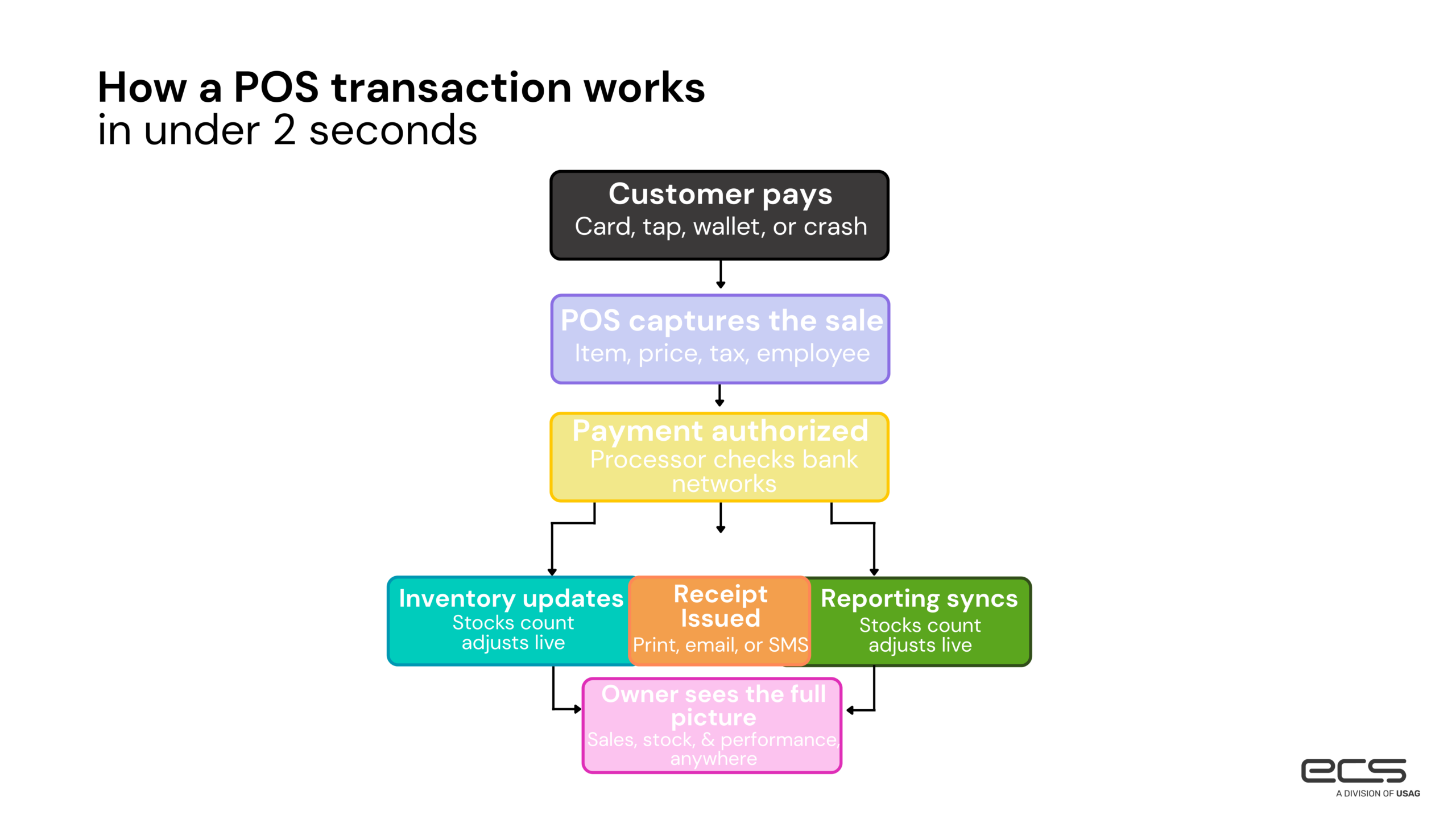
It happens so quickly. The payment processing side deserves special attention because it’s the engine that actually moves money. Payment processing POS systems connect merchants with the banking networks responsible for authorizing and settling transactions. Without that connection, a POS platform can track sales all day long without collecting a single dollar.
But a sophisticated POS interface doesn’t necessarily mean the payment side is working efficiently. Poor integrations can lead to duplicate data entry, delayed reporting, and time-consuming reconciliation issues. But, the smoother the connection between payments and operations, the less staff have to think about it.
Key Features of Modern POS Systems
Modern POS features have stepped up quite a bit in recent years. But feature lists can be misleading. Many POS providers claim to offer reporting, inventory tools, employee management, and payment acceptance. The real question is, however, whether those features solve practical problems for your specific business, actually do what they say, or if they are just listed to check marketing boxes.
Payment Processing Integration
Consumers have become remarkably flexible in how they pay. But businesses don’t have that luxury. Customers expect businesses to accept credit cards, debit cards, digital wallets, contactless payments, ACH transactions, and online payment methods without hesitation. If the payment process feels outdated or inconvenient, many customers simply move on.
According to the Federal Reserve’s Survey and Diary of Consumer Payment Choice, electronic payment usage continues to rise, with credit card usage increasing significantly in 2024. The number of credit card payments increased by about two additional payments per person per month. Payment flexibility is no longer a competitive advantage. It’s basic customer service.
Inventory Management
Inventory mistakes can be expensive. One of the shortcomings is when a product appears available online, but isn’t actually in stock, which can create customer frustration. And when your numbers are off, reorders get delayed. But what’s worse is that excess inventory can sit untouched for months because reporting failed to reveal slowing demand. And excess inventory means money is just sitting there on product you already purchased. Many retail POS solutions help eliminate those blind spots. They update inventory automatically.
As transactions occur, managers gain visibility into:
- Fast-moving products
- Slow sellers
- Reorder timing
- Seasonal buying patterns
Cornell University research suggests inventory inaccuracies can cost merchants approximately 4% of annual sales revenue. 4% may not seem like a lot, but let’s look at some numbers. For every $100,000, that’s $4,000. For every $10,000, that’s $400. So your business is wasting hundreds, if not thousands, of dollars, just because your inventory system is broken, and your numbers are off. There’s an easy way to resolve this.

Customer Reporting and Analytics
Every transaction tells a story. Many businesses have a way to collect enormous amounts of customer data. But if you’re collecting and not doing anything with that data, it’s a huge opportunity loss.
A strong reporting system can reveal specific consumer patterns that would be incredibly difficult to spot otherwise. Average ticket size, repeat visits, seasonal shifts, product performance, and purchasing behavior often become much clearer once the data is organized properly. Good analytics help make judgments more informed.
Employee and User Management
Few owners enjoy spending time investigating preventable mistakes. Permission controls, employee activity tracking, and user management tools help reduce confusion while creating accountability across the organization.
It’s not glamorous software functionality. Neither is discovering six months later that a simple process issue has been costing money every week.
Mobile and Cloud-Based Access
One of the biggest shifts in POS technology isn’t what customers see. It’s what owners can see. Cloud-based POS systems allow operators to monitor sales activity, inventory levels, and performance metrics from virtually anywhere.
For multi-location businesses, that level of visibility can dramatically simplify management. Business doesn’t stop when you’re away from the building. Your reporting shouldn’t either.
Types of POS Systems
Not every operation needs the same technology. A coffee shop and an auto repair business may both accept credit cards, but their workflows have very little in common.
In this video, we break down the best POS systems that keep your business running smoothly, save you money, and ensure you never lose a sale due to outages.
Retail POS Systems
Retail POS solutions typically focus on inventory management, barcode scanning, customer relationship management, and sales reporting. A missing item on a shelf can be frustrating. A missing item during a busy shopping season becomes expensive. And missing customer retargeting strategies can be detrimental to customer loyalty.
Restaurant POS Systems
Restaurants have an entirely different set of challenges, such as table management, kitchen communication, menu modifications, tipping, and order routing. These all require specialized functionality. Software built for retail environments can struggle to effectively handle restaurant workflows.
Mobile POS Systems
Some businesses don’t operate behind a fixed counter. Food trucks, event vendors, field service providers, pop-up shops, and mobile sales teams often rely on mobile POS systems that run through tablets and smartphones. The ability to take payments anywhere has become surprisingly powerful for many operators.
Cloud-Based POS Solutions
Cloud-based POS systems continue gaining popularity because they simplify growth. They update software automatically, centralize all data, and make it easier to manage multiple locations.
Industry-Specific Platforms
In many cases, specialized tools matter. A winery, a tattoo shop, a dog groomer, a restaurant, and a medical office all have unique operations. Therefore, they have different needs. Industry-specific POS payment solutions can address those needs far better than generic systems attempting to serve everyone equally.
Benefits of Using a Modern POS System
The value of a POS system rarely comes from one feature. It comes from hundreds of small efficiencies that compound over time.
Consider what happens when information moves automatically between sales, inventory, reporting, and payment processing. Staff spend less time correcting errors. Managers spend less time gathering data. Owners spend less time wondering whether the numbers are accurate.
With modern POS systems, your checkout experiences become faster, reporting becomes easier, and your inventory decisions become smarter. Customers notice some of those improvements, and your staff will appreciate all of them.
The businesses that get the most value from POS technology typically aren’t chasing features. They’re removing friction.
How POS Systems Support Payment Processing
Payment acceptance has changed dramatically over the last decade. Customers increasingly expect businesses to accept:
- Credit cards
- Debit cards
- Contactless payments
- Mobile wallets
- ACH transfers
- Online payments
According to Federal Reserve payment research, electronic payment activity continues to grow while cash dwindles. The challenge beyond accepting more payment methods is managing them efficiently.
A well-designed POS platform centralizes all of your payment activity, making it easier to track your transactions. Which helps you efficiently monitor your business performance, and maintain visibility into your cash flow. Instead of piecing together information from multiple systems, operators can access what they need from a single location.
At ECS Payments, this is often where businesses uncover unexpected opportunities for improvement. Better payment integrations frequently lead to cleaner reporting, faster reconciliation, improved customer experiences, and less administrative work throughout the organization.
The payment itself may only take a few seconds. Everything surrounding it matters just as much.
Common Challenges Businesses Face with POS Systems
Technology should remove obstacles, but sometimes, it creates them.
With outdated hardware and aging software systems, it can become harder to support, security updates become less frequent, and integration options start disappearing.
Outdated tech can also create connectivity issues. Many companies rely on accounting software, ecommerce platforms, inventory systems, CRM tools, and payment processors simultaneously. When those systems don’t communicate effectively, employees end up transferring information manually.
When systems aren’t properly connected, manual reconciliation creates another frequent headache. Matching transactions, deposits, and reports can consume hours every month.
Growth can expose weaknesses, too. A platform that works perfectly for one location may become increasingly difficult to manage across several locations. Scalability tends to become important right around the time a business can least afford a disruptive technology change.
How POS Systems Can Improve Cost Efficiency
Modern POS systems support cost efficiency by helping teams automate repetitive work, improve reporting accuracy, streamline payment collection, and manage inventory more effectively.
This means fewer inventory errors, reduced manual data entry, less time spent building reports, and faster checkout times, even during busy periods.
Cloud deployments can contribute as well. Research suggests organizations adopting cloud-based POS environments reduce maintenance burdens and often experience 30 to 40% lower operational technology costs. The savings often come from saved time. And time is expensive.
Cloud-Based POS Systems vs Traditional POS Systems
Years ago, this debate generated far more disagreement. Today, the gap is narrowing. Traditional systems often require local servers, manual updates, and more hands-on maintenance. For some highly specialized environments, that setup may still make sense.
Most growing businesses, however, are looking for flexibility. Cloud-based POS systems offer remote access, automatic updates, centralized reporting, simpler scaling, and stronger integration opportunities. Owners gain visibility without needing to be physically present at a specific location. That’s become increasingly valuable, especially for companies operating across multiple locations or planning future expansion.
How To Choose The Best Pos Systems For Businesses
Choosing a POS platform is less about finding the most features and more about finding the right features for your specific industry. Start with your actual workflow.
A retail shop’s priorities will look very different from a restaurant’s. And a service business may care more about scheduling and invoicing than barcode scanning and inventory.
Payment processing deserves close attention as well. The connection between your POS platform and payment provider influences reporting, reconciliation, customer experience, and operational efficiency every day.
Employees should also be able to learn the system quickly without extensive training.
But you also have to think beyond your current situation. Can the platform support future locations or additional staff? New payment methods or more sophisticated reporting requirements?
Finally, security is non-negotiable. Any system under consideration should support PCI compliance standards and maintain strong protections around payment data.
With ECS Payments, you’ll receive help every step of the way. Hear from our technical support manager, Sebastian Perry on how our tech team guides you through each step to ensure you select the POS that best fits your businesses needs.
Final Thoughts
For many organizations, their POS system has become one of the most important operational platforms they use. The right system doesn’t simply help you accept payments. It helps you understand what’s happening inside your business, from inventory management, reporting, customer experience, payment processing, employee oversight, and business visibility.
When that system is paired with integrated payment solutions designed to support efficiency and growth, the impact extends far beyond the checkout counter.
If you’re evaluating your current setup or planning for future growth, ECS Payments can help you build a payment and POS strategy that supports the way your business actually operates.
